Scaling Reads
The standard read-to-write ratio starts at 10:1 but often reaches 100:1 or higher for content-heavy applications.
More often than not, this isn't a software problem you can debug your way out of - it's physics. CPU cores can only execute so many instructions per second, memory can only hold so much data, and disk I/O is bounded by the speed of spinning platters or SSD write cycles. When you hit these physical constraints, throwing more code at the problem won't help.
Solution
- Optimize read performance within your database
- Scale your database horizontally
- Add external caching layers
Optimize Within Your Database
Indexing - Making o(n) to o(log n)
An index is essentially a sorted lookup table that points to rows in your actual data. Think of it like a book index - instead of scanning every page to find mentions of "database," you check the index at the back which tells you exactly which pages to look at.
When you query without an index, the database performs what's called a full table scan, it reads every single row to find matches. With an index, it can jump directly to the relevant rows. This turns a linear O(n) operation into a logarithmic O(log n) operation, which is the difference between scanning 1 million rows versus checking maybe 20 index entries.
under-indexing kills more applications than over-indexing ever will.
Hardware Upgrades
Denormalization Strategies
Denormalization is a classic example of optimizing for reads at the expense of writes
Another technique is to better organize data within your single database. Normalization is the process of structuring data to reduce redundancy by splitting information across multiple tables to avoid storing duplicate data. While this saves storage space, it makes queries more complex because you need joins to bring related data back together.
Scale Your Database Horizontally
a general rule of thumb is that your DB will need to scale horizontally (or add a cache - more on that later) when you exceed 50,000-100,000 read requests per second (assuming you already have proper indexing).
Read Replicas
The first approach to scaling beyond a single database is adding read replicas. Read replicas copy data from your primary database to additional servers. All writes go to the primary, but reads can go to any replica. This distributes read load across multiple servers.
Beyond solving the throughput problem, read replicas also provide redundancy as a nice added benefit. If your primary database fails, you can promote a replica to become the new primary, minimizing downtime.
Leader-follower replication is the standard approach. One primary (leader) handles writes, multiple secondaries (followers) handle reads.
Replication can be synchronous (slower but consistent) or asynchronous (faster but potentially stale).
Database Sharding for Write Scaling - Functional vs Geographical
sharding adds significant operational complexity and is primarily a write scaling technique.
For read scaling, sharding helps in two main ways: smaller datasets mean faster individual queries, and you can distribute read load across multiple databases.
Read replicas distribute load but don't reduce the dataset size that each database needs to handle. If your dataset becomes so large that even well-indexed queries are slow, database sharding can help by splitting data across multiple databases.
Add External Caching Layers
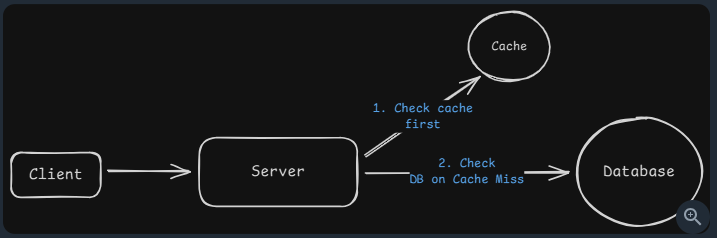
most applications exhibit highly skewed access patterns. On Twitter, millions read the same viral tweets. On e-commerce sites, thousands view the same popular products. This means you're repeatedly querying your database for identical data - data that rarely changes between requests.
Caches exploit this pattern by storing frequently accessed data in memory. While databases need to read from disk and execute queries, caches serve pre-computed results directly from RAM. This difference translates to sub-millisecond response times versus tens of milliseconds for even well-optimized database queries.
Application-Level Caching